The AI-powered frontend development space has split into three distinct approaches. They look similar on the surface — “give it input, get UI code” — but they solve fundamentally different problems and produce fundamentally different output.
Understanding which approach fits your workflow saves hours of frustration. Here’s how v0, Bolt, and ui.rip actually compare.
How v0, Bolt, and ui.rip Work
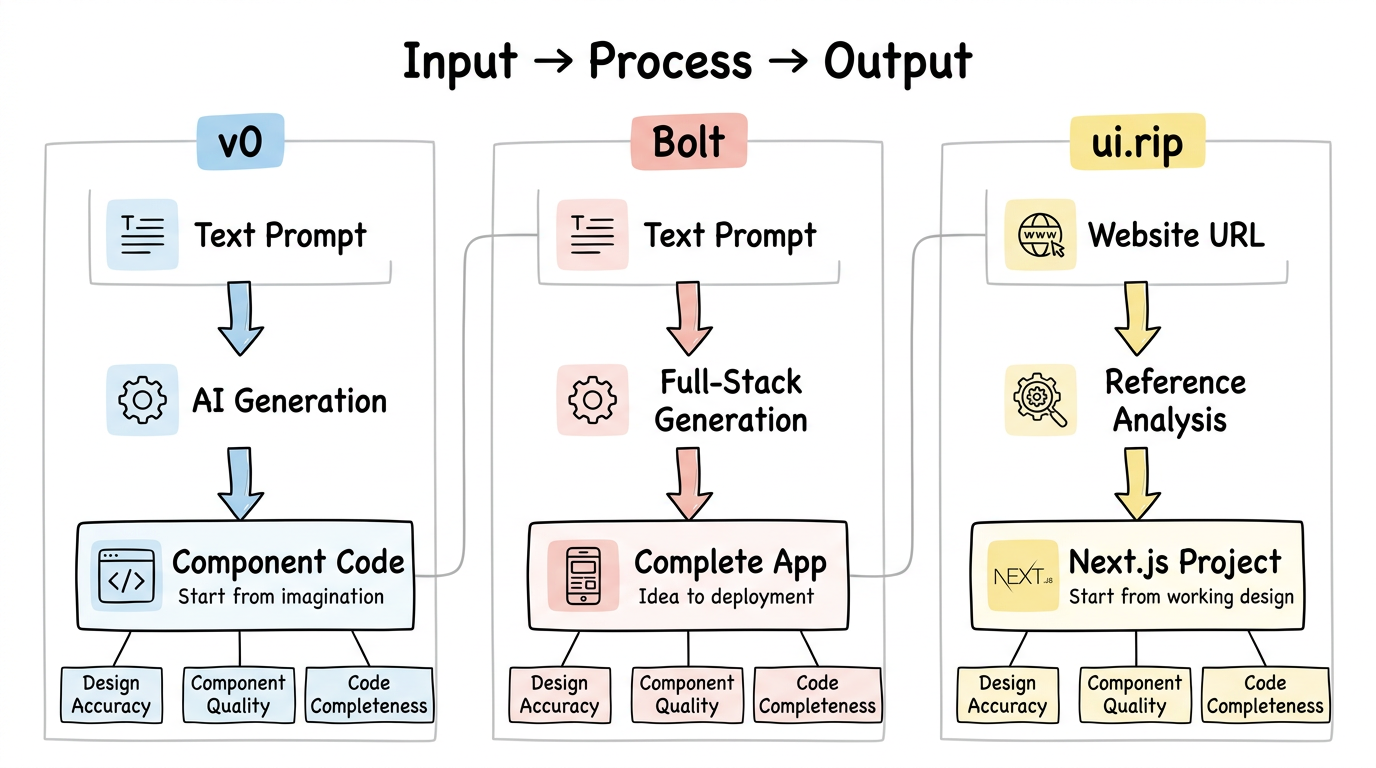
Before diving into features, understand the core philosophy behind each tool:
v0: Prompt → Component
Vercel’s v0 takes a text description and generates React components. You describe what you want — “a pricing table with three tiers” — and v0 produces the code.
Input: Natural language prompt Output: React/Next.js component code Philosophy: Start from imagination, generate from description
Bolt: Prompt → Full App
StackBlitz’s Bolt takes a prompt and generates a complete, runnable application — not just a component, but a full project with routing, state management, and deployment configuration.
Input: Natural language prompt Output: Complete runnable application Philosophy: Go from idea to deployed app as fast as possible
ui.rip: Website → Code
ui.rip takes an existing website URL and reverse engineers it into a Next.js project with proper components, design tokens, and TypeScript.
Input: A live website URL Output: Next.js project with extracted components Philosophy: Start from what already works, adapt it to your needs
When to Use v0, Bolt, or ui.rip
The right tool depends entirely on what you’re starting with and what you need.
Use v0 when you’re designing from scratch
You’re a developer who needs a dashboard layout. You don’t have a reference design — you just have requirements. v0 excels here because it can generate polished, functional components from vague descriptions.
Prompt: "A settings page with a sidebar navigation, account section
with avatar upload, and a notifications toggle panel"
v0 produces something reasonable and customizable. You iterate by refining the prompt or editing the generated code. The workflow feels like pair-programming with a designer.
v0’s strengths:
- Fast iteration on new designs
- shadcn/ui integration means consistent, accessible components
- Good at common UI patterns (tables, forms, dashboards)
- Built-in preview and editing
v0’s limitations:
- Output is generic — it generates a pricing table, not your pricing table
- Can’t reference specific brand styles, exact spacing, or pixel-perfect layouts
- Prompts struggle with complex, multi-section pages
- No awareness of your existing codebase or design system
Use Bolt when you need a working prototype fast
You’re in a hackathon, or you need to validate an idea with a functional prototype. Bolt generates entire applications — frontend, backend logic, database schemas — from a single prompt.
Prompt: "Build a project management app with kanban boards,
team member assignment, and due date tracking"
Bolt scaffolds the entire thing: React frontend, API routes, state management, deployment config. You can preview it immediately in the browser.
Bolt’s strengths:
- Full-stack output (not just components)
- Instant preview in-browser (via WebContainers)
- Good for MVPs and prototypes
- Handles routing, state, and data models
Bolt’s limitations:
- Generic output — functional but not polished
- No awareness of existing designs or brands
- Code quality varies — works for prototypes, often needs rewriting for production
- Hard to get specific visual results through prompts alone
Use ui.rip when you’re working from an existing reference
You’re rebuilding a client’s WordPress site in React. Or you’re migrating an internal tool to Next.js. Or you saw a competitor’s landing page and want to build something with the same structural quality. You have a reference — a real website that already looks right.
Input: https://linear.app (or any live website URL)
ui.rip captures the site, analyzes its component structure, extracts design tokens, and generates a Next.js project that matches the original.
ui.rip’s strengths:
- Output matches a real, proven design — not a generic interpretation
- Proper component extraction (Header, Footer, Card patterns)
- Real design tokens (exact colors, spacing, typography from the original)
- Handles JavaScript-rendered sites, SPAs, and complex layouts
- Tailwind CSS classes mapped from computed styles
ui.rip’s limitations:
- Requires a reference website — can’t generate from prompts
- Captures structure and style, not application logic (state management, API calls)
- Output is a starting point that needs wiring up with your data
v0 vs Bolt vs ui.rip: Feature Comparison
| Dimension | v0 | Bolt | ui.rip |
|---|---|---|---|
| Input | Text prompt | Text prompt | Website URL |
| Output | Component code | Full application | Next.js project |
| Design accuracy | Approximate | Approximate | Pixel-level |
| Component extraction | Single component | App-level | Section-level |
| Design tokens | Generic/shadcn | Generic | Extracted from source |
| JavaScript rendering | N/A | N/A | Yes (headless Chrome) |
| Framework detection | N/A | N/A | Yes |
| TypeScript | Yes | Yes | Yes |
| Tailwind CSS | Yes (shadcn) | Varies | Yes (from computed styles) |
| Best for | New designs | Prototypes | Migrations & rebuilds |
| Pricing | Free tier + paid | Free tier + paid | Waitlist (free beta) |
Design Accuracy: Prompt-Based vs Reference-Based
This is where the three approaches diverge most dramatically.
Prompt-based tools (v0, Bolt) generate UI from descriptions. But language is inherently imprecise for visual design. “A modern SaaS landing page” means something different to every designer. Even detailed prompts — “a hero section with a gradient background from indigo-600 to purple-500, 48px heading, 18px subheading with 60% opacity” — produce results that look plausible but not specific.
Try this exercise: describe your favorite website’s hero section in words, then use v0 to generate it. The result will be a reasonable hero section. But it won’t be that hero section.
Reference-based tools (ui.rip) skip the description problem entirely. Instead of translating words into pixels, they read the pixels (and the DOM, and the styles) directly. The output matches the reference because it was extracted from the reference.
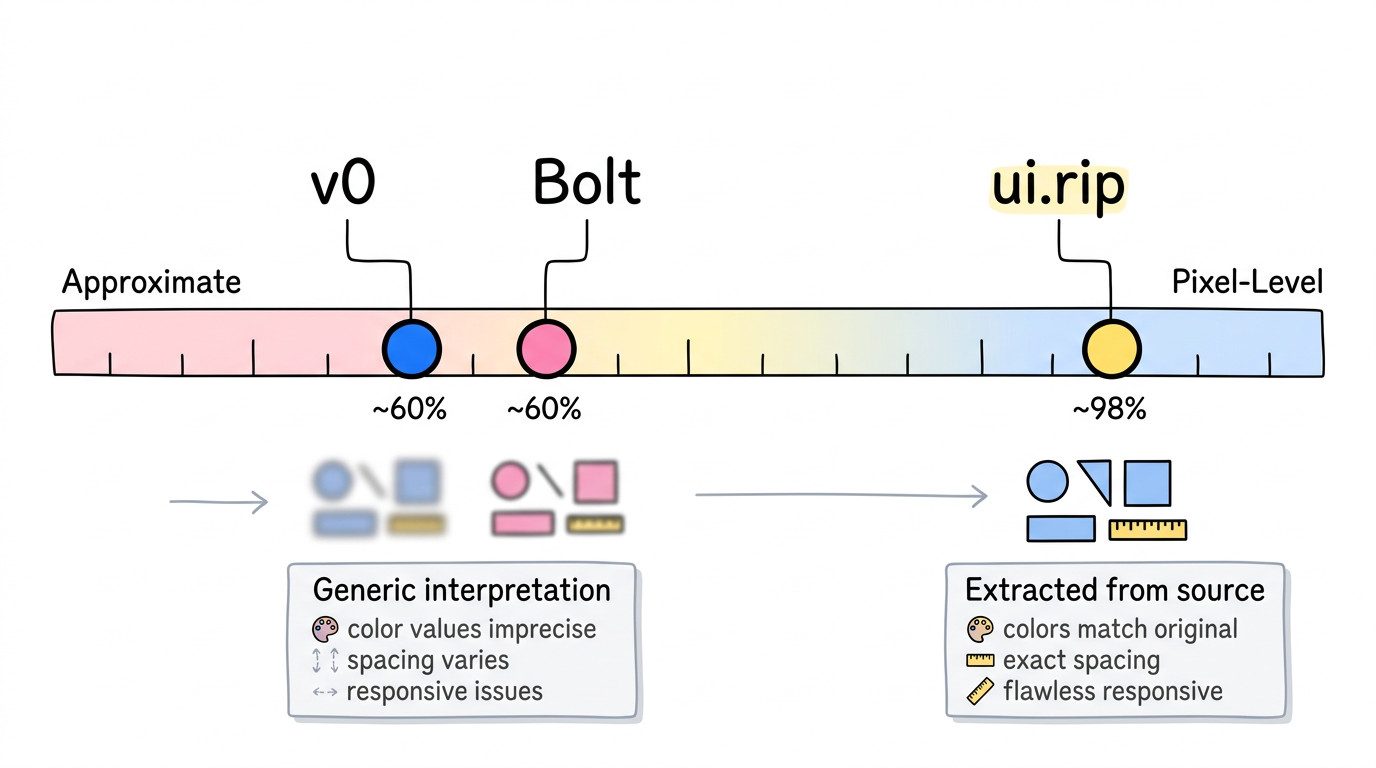
This distinction matters most for:
- Agency work — clients expect their site to look exactly like the approved design, not “close enough”
- Migrations — the new React version needs to match the old WordPress version pixel-for-pixel
- Brand consistency — exact colors, exact spacing, exact typography
Using v0, Bolt, and ui.rip Together
These tools aren’t mutually exclusive. A realistic workflow might use all three:
- ui.rip to reverse engineer a competitor’s landing page → understand their component architecture and design patterns
- v0 to generate new sections that don’t exist on the reference site → a pricing table, a feature comparison, a FAQ section
- Bolt to prototype an admin dashboard → quickly validate the UX before investing in production code
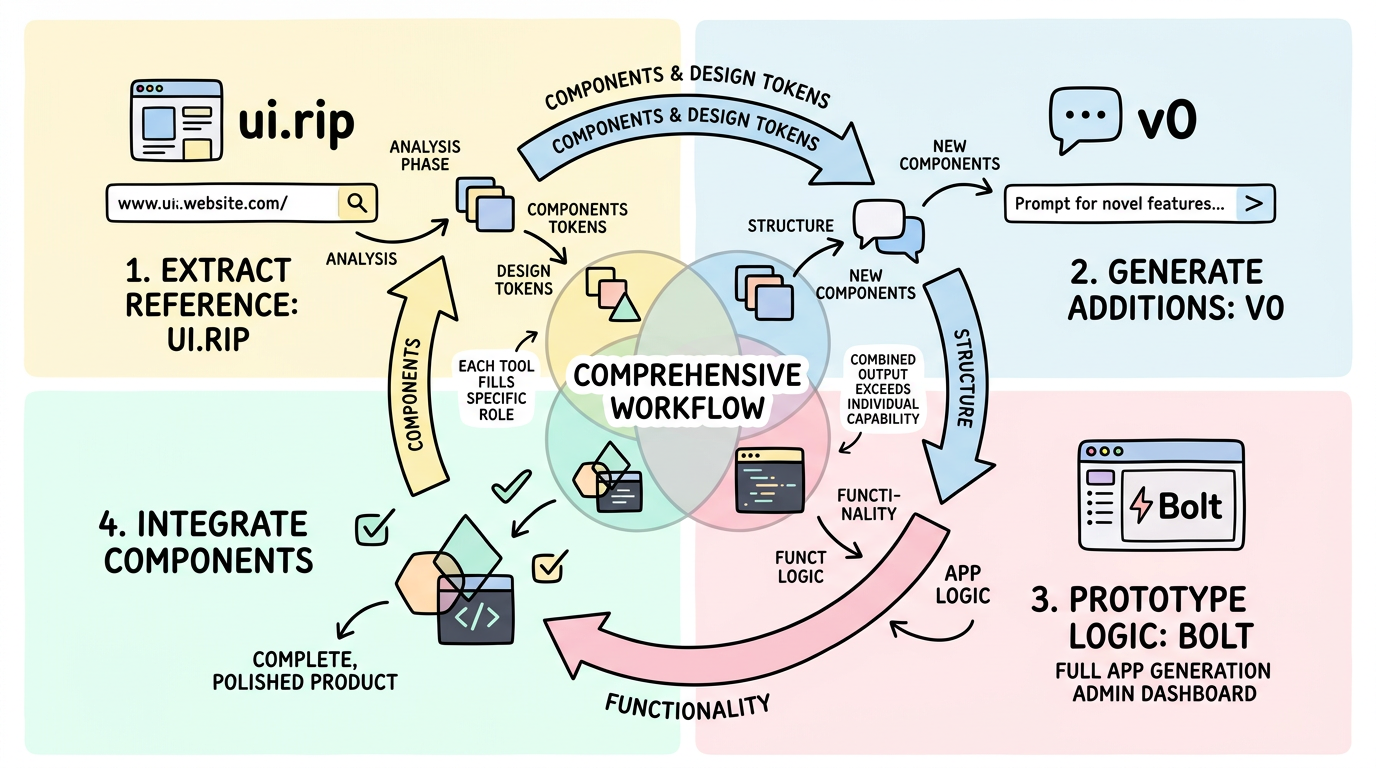
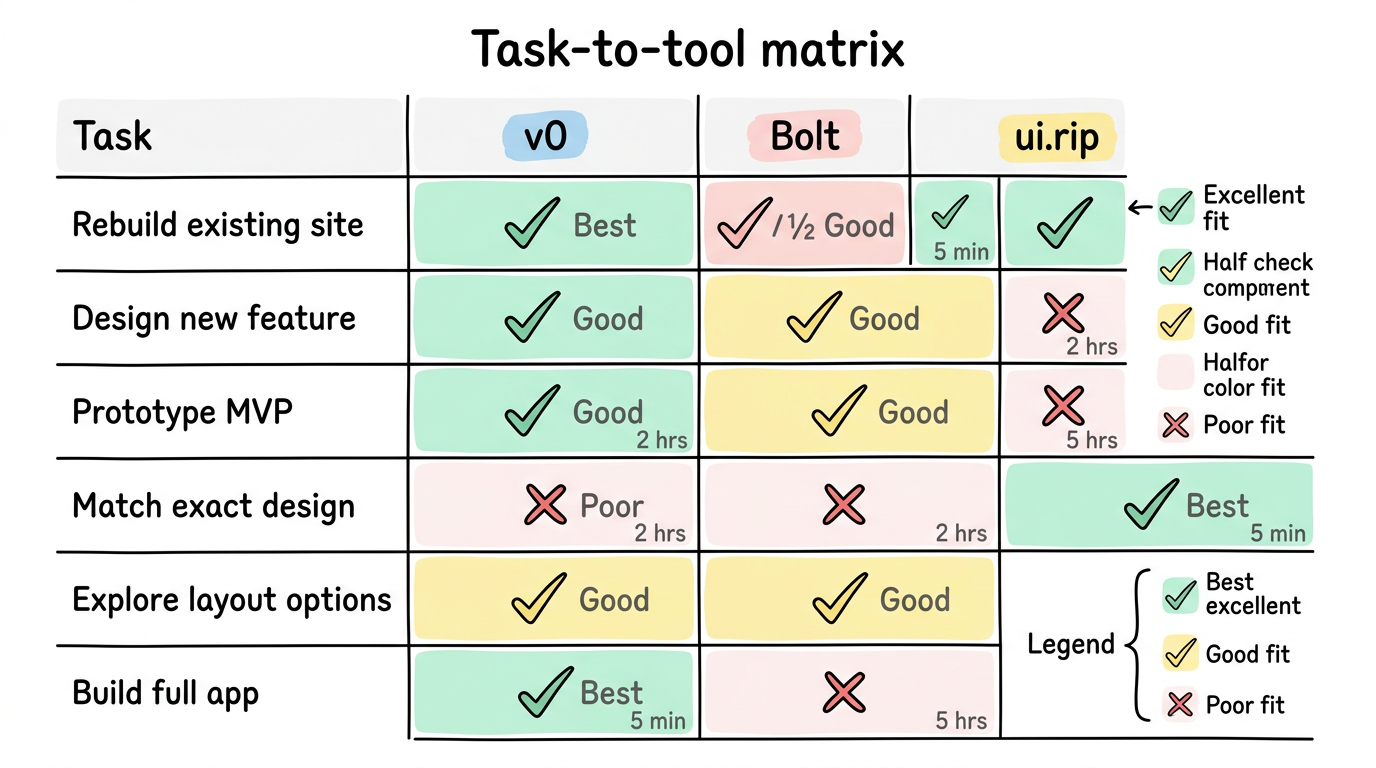
The key is matching the tool to the task:
| Task | Best Tool | Why |
|---|---|---|
| ”Rebuild this site in React” | ui.rip | You have a reference, need accuracy |
| ”Design a new feature” | v0 | Starting from requirements, not references |
| ”Prototype this idea” | Bolt | Need a full working app quickly |
| ”Match this exact design” | ui.rip | Prompt-based tools can’t guarantee pixel accuracy |
| ”Explore layout options” | v0 | Fast iteration through prompts |
| ”Build an MVP for demo day” | Bolt | Full-stack in minutes |
Which AI Code Generator Is Best?
There’s no universal answer. These tools compete on different axes:
- Speed of new creation: Bolt > v0 > ui.rip
- Design accuracy to a reference: ui.rip > (no comparison — v0 and Bolt don’t take references)
- Code quality for production: ui.rip ≈ v0 > Bolt
- Full-stack completeness: Bolt > ui.rip > v0
- Component reusability: ui.rip ≈ v0 > Bolt
The AI frontend space isn’t converging on one approach. It’s diverging into specialized tools for specialized workflows. Understanding which workflow you’re in determines which tool you pick.
FAQ
Can I use v0 or Bolt to recreate a specific website?
You can try, but you’ll spend more time refining prompts than you would just building it manually. Prompt-based tools generate interpretations, not recreations. If you need to match a specific design, ui.rip’s reference-based approach is more direct.
Is ui.rip just copying websites?
ui.rip captures structure and design patterns — the same patterns any developer would identify by studying a website in DevTools. The output is clean React/Next.js code, not a cloned HTML file. You still need to add your own content, data, and business logic. It’s a starting point for development, not a website duplicator.
Which one has the best free tier?
v0 offers generous free usage. Bolt has a free tier with limitations. ui.rip is currently in waitlist beta (free during beta). All three have or will have paid tiers for professional use.
Choose the right starting point
Every UI project starts somewhere. The question is: where?
The best output comes from the best input. If you have a reference that works, start there.
→ ui.rip vs v0 detailed comparison → ui.rip vs Bolt detailed comparison → Convert any website to React